WordPress Multilingual Support

Take Your WordPress Site Global

Professional multilingual setup for WordPress using WPML, Polylang, or TranslatePress — language switchers, translated SEO, RTL support, and a clean architecture that scales to as many languages as you need.
Multilingual sites configured
0 +
Languages worked with, incl. RTL
0 +
Plugins mastered: WPML, Polylang, TranslatePress
0
Years WordPress experience
0 +

This is a setup & configuration service, not a translation service. I build the multilingual architecture — plugin setup, language switcher, URL structure, SEO config — and you provide the translated content, or work with your own translator/agency. I'm happy to recommend translation partners if you need one.

The Right Tool for Your Site's Needs

There’s no single “best” multilingual plugin — the right choice depends on your site size, content type, and budget. I’ll recommend the right fit, not just the one I prefer.
WPML
Best for complex sites, WooCommerce, page builders
Polylang
Lightweight, great for blogs & content sites
TranslatePress
Visual, in-context translation editing
WooCommerce Multilingual
Multi-currency & translated product catalogs

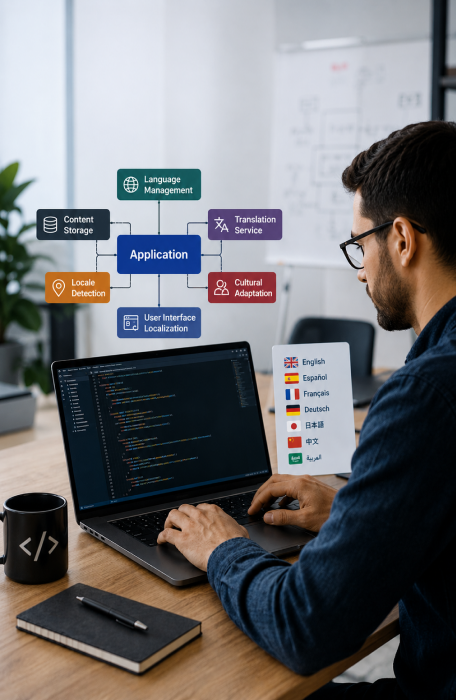
Full Multilingual Architecture, Done Right

A poorly configured multilingual site causes duplicate content SEO penalties and broken translations. Every setup is built to avoid both.

Plugin Installation & Configuration

WPML, Polylang, or TranslatePress installed and configured to match your site's structure — pages, posts, custom post types, and menus.

URL Structure & SEO Setup

Proper hreflang tags, language-specific URLs (subdirectory or subdomain), canonical tags, and translated slugs configured for clean indexing.

Language Switcher Design

A clean, on-brand language switcher placed in your header, footer, or menu — styled to match your theme, with flags or text labels as you prefer.

RTL Language Support

Full right-to-left layout support for Arabic, Hebrew, and other RTL languages — including theme and custom CSS adjustments so nothing breaks visually.

Theme & Plugin Compatibility

Ensuring your theme, page builder (Elementor, Divi, etc.), and key plugins work correctly across all configured languages without breaking layouts.

WooCommerce Multilingual Setup

Translated product catalogs, multi-currency display, translated checkout flow, and language-specific shipping/tax rules where needed.

Translation Workflow Setup

Configuring the translation editor/dashboard so you or your translator can work efficiently — string translation, media, and widget content included.

QA Across All Languages

Every configured language is tested for broken layouts, missing strings, incorrect switcher behavior, and SEO tag accuracy before handoff.

WPML vs Polylang vs TranslatePress

A quick comparison to help you understand what I’ll likely recommend based on your site.
FeatureWPMLPolylangTranslatePress
Best forComplex / WooCommerce sitesBlogs & content sitesVisual, in-page editing
WooCommerce support Strong Via add-on Supported
Visual translation editorNoNoYes
Free version availableNoYesYes
Page builder compatibility Excellent Good Good
RTL language supportYesYesYes

Why This Setup Matters More Than You'd Think

Multilingual plugins are easy to install and very easy to misconfigure. The difference shows up in SEO and user experience.

SEO done correctly

Proper hreflang implementation prevents Google from treating your translated pages as duplicate content — a very common, costly mistake.

No broken layouts

RTL languages and longer translated text strings often break themes. Every layout is checked and fixed across every configured language.

Unbiased plugin advice

I'm not tied to one plugin. You get the option that genuinely fits your site, not the one that's easiest for me to upsell.

Compatibility-tested

Page builders, forms, and key plugins are tested in every language — not just the default one — before the project is considered done.

Workflow you can manage

You're left with a translation workflow your team or translator can actually use independently going forward, with no ongoing dependency on me.

Clear scope, clear price

Because translation work is excluded, pricing stays predictable — you're paying for technical setup, not by-the-word translation costs.

From One Language to Many, Step by Step

A methodical process built for accuracy under pressure — because guesswork on a compromised site causes more damage.

01

Site & content audit

I review your current site structure, page builder, theme, and key plugins to determine the best multilingual plugin and approach for your case.

02

Plugin setup on staging

The chosen plugin is installed and configured on a staging copy of your site — language settings, URL structure, and default language confirmed with you.

03

Language switcher & SEO config

Language switcher is styled and placed, hreflang tags are implemented, and translated URL slugs are set up correctly for search engines.

04

You add translated content

Once the framework is ready, you (or your translator) add the translated content using the configured workflow — I’m available to support this step.

05

QA across all languages

Every language version is checked for layout issues, broken strings, RTL display problems, and correct switcher behavior.

06

Go live

The fully configured multilingual setup is pushed live, with a walkthrough of how to add or edit languages going forward.

Fixed-Price Setup Packages

Priced by number of languages and site complexity, not by the hour. Translation costs are separate and depend on your content volume.

Single Second Language

From $249
1 additional language

Multi-Language Setup

From $449
Up to 4 languages

WooCommerce Multilingual

From $699
E-commerce sites

What Client Say?

I have worked with LathiyaSolutions on several projects. All work was completed quickly and professionally. There are very few specialists who have such extensive skills and professionalism as Vijay Lathiya.

review-sec-img-1
Jan Harmening Client

The team at Lathiya delivered a top-notch website. Their attention to detail, professionalism, and commitment to quality are unparalleled. They were responsive to my needs and made the entire process seamless.

review-sec-img-2
Godwin Amefia Client

Absolutely amazing service! I can't believe the guy solved my issue over the phone within minutes, that I had been struggling with since the past two days! This kind of service is literally rare, I am so happy to have found them!

review-sec-img-3
Srijana Saha Client

If you need an expert then you have to contact them! They took my website and transformed in just few days! I highly recommend them to anyone out there! My website rocks now! Thank you Lathiya Solutions!!!

review-sec-img-4
Alessandro Iorio Client

Great experience working with Lathiya Solutions. Very professional team with strong WordPress expertise and quick support. Highly recommended!

review-sec-img-5
Jimmy Paul Client

Hire WPML Developer – FAQs

Do you provide the actual translations?
No — this service covers the technical setup only: plugin configuration, language switcher, URL structure, and SEO tags. You provide the translated content, either written yourself or through your own translator or agency. I’m happy to recommend reliable translation services if you need a referral.
It depends on your site. WPML is generally best for WooCommerce stores and complex sites with page builders. Polylang is lighter and works great for blogs and content-focused sites. TranslatePress is ideal if you want a visual, point-and-click translation interface. I’ll recommend the right fit after reviewing your site during the audit step.
A well-configured setup has minimal performance impact. WPML in particular can add overhead if misconfigured, so I optimize the database structure and caching compatibility as part of every setup to keep load times unaffected.
Yes. The architecture is built to scale — once the initial setup is in place, adding another language is a much smaller task than the first one. I can handle additional languages later or train your team to add them independently.
In most cases, yes. All three plugins I work with have varying levels of page builder support, and I test compatibility specifically with your builder during setup. If there are limitations with your specific combination, I’ll flag them before starting the project.
A single additional language typically takes 3-5 business days. Multi-language setups (up to 4) run 1-2 weeks. WooCommerce multilingual setups take longer due to product catalog complexity — usually 2-3 weeks depending on store size.

Ready to Reach a Global Audience?

Tell me which languages you need and a bit about your site, and I’ll recommend the right plugin and a clear path to get there.

Let’s Work Together!

Address

416, Angle Square, Uttran VIP Circle, Surat, Gujarat 394105

Scroll to Top